Smoothing 2D grids
Using the Smooth tool (prepare >Post-Processing Tools > 2D Grid Tools > Smoothing > Smooth), you can apply a smoothing filter to 2D grids in order to create better consistency across their surfaces. This filter is recursively applied over the surface. The TVDSS value of the center point (of the filtered area or footprint) is then adjusted based on the weighting function chosen. To use the filter:
- Open the Smooth tool.
- At the top of the form, select a source from the 'Source' drop-down list. This selection populates the table below.
- Check the checkboxes next to the 2D grid(s) that you want to smooth.
- Select the weighting function to be applied to each node from the Filter type drop-down list (the filter is applied to all values that are within the filter footprint distance):
- Mean Gaussian weights The degree of smoothing is determined by the standard deviation of the Gaussian. The output is a weighted average, with the average weighted more towards the value of the central node. This will result in gentler smoothing and preserved edges compared to the mean uniform weights filter.
- Median This method uses the median of the data points. The median is the value separating the higher half of the data sample, from the lower half. This averaging method reduces the importance of data outliers.
- Mean uniform weights The smoothing algorithm uses the mean of the data points.
- Inverse distance weighted This method will only use the distance to data points as input for smoothing the surface. The closer a data point is to the node being estimated, the more influence, or weight, it has in the smoothing process.
- Specify the dimensions of the filter in the x and y directions in X filter footprint and Y filter footprint. This value must be an odd number. The value you specify here determines how many neighboring nodes are taken into account when applying the filter.
- Click Apply or OK to smooth the selected 2D grid(s).
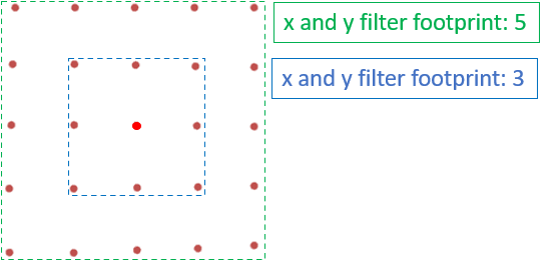
The filter footprint determines how many data points are included in the smoothing algorithm. click to enlarge